

Create And Manage Webhooks
api.video provides webhook notifications in the form of
POST
requests, with a JSON payload that contains detailed event data. Webhooks can push notifications directly to your server, saving you the need to poll api.video for changes.
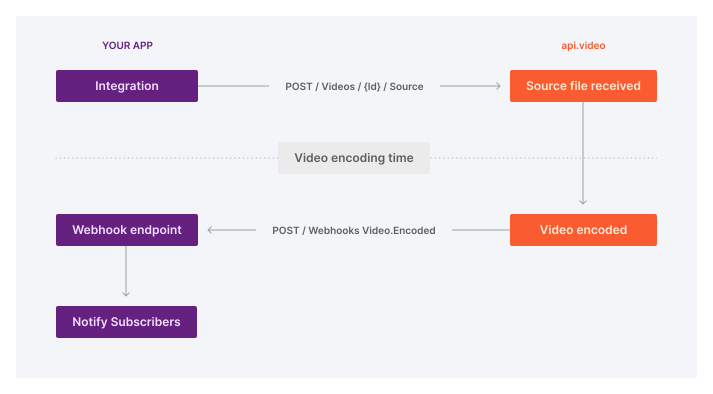
Here’s how the webhook flow looks like, using
video.encoding
as an example:
Webhook events
These are the available webhook events:
| Event | Triggers when... |
|---|---|
live-stream.broadcast.started
|
A live stream broadcast has started. |
live-stream.broadcast.ended
|
A live stream broadcast has ended. |
video.source.recorded
|
A live stream has been completed and the recording of the live stream is ready to be transcoded. This means that the video in queue for transcoding. |
video.encoding.quality.completed
|
A set quality version of encoding is complete for a video that you uploaded.
For each video, the MP4 asset is transcoded only once, hence you only receive one webhook notification for the MP4 asset, with the final source quality. The HLS asset's webhook notification triggers multiple times with each quality from the lowest 240p to the highest, up to 4k, based on the source you uploaded. For example, if you upload a video in 720p quality, you receive 5 webhooks in total: - 1 webhook with 720p quality for the MP4 encoding - 4 webhooks for 240p, 360p, 480p, and 720p for the HLS encoding. |
video.caption.generated
|
An automatic caption has been generated. |
video.summary.generated
|
An automatic summary has been generated. |
Check out the API reference for detailed descriptions of each webhook event's request headers and payloads.
Subscribe to webhooks
You can subscribe to webhooks via the Dashboard and the API. To actually receive the webhooks, you need to set up a server that accepts
POST
requests from api.video. You can use tools like
Webhook.site
to test the process. Tools like this enable you to preview the webhook events, and test whether webhooks arrive to your server.
Via the dashboard
You can subscribe to webhooks in just a couple of clicks on the Webhooks tab in your Project settings.
Via the API
You can use the Create webhook endpoint to create a webhook subscription. Simply provide your server URL and the list of events you want to subscribe to:
curl --request POST \
     --url https://ws.api.video/webhooks \
     --header 'Accept: application/json' \
     --header 'Authorization: Bearer {your API key}' \
     --header 'Content-Type: application/json' \
     --data '{"events": [
		"live-stream.broadcast.started", "live-stream.broadcast.ended", "video.encoding.quality.completed"
	],
     "url": "https://example.com/webhooks"
}'
package main

import (
    "context"
    "fmt"
    "os"
    apivideosdk "github.com/apivideo/api.video-go-client"
)

func main() {
    client := apivideosdk.ClientBuilder("YOUR_API_TOKEN").Build()
    // if you rather like to use the sandbox environment:
    // client := apivideosdk.SandboxClientBuilder("YOU_SANDBOX_API_TOKEN").Build()

    webhooksCreationPayload := *apivideosdk.NewWebhooksCreationPayload([]string{"Events_example"}, "https://example.com/webhooks") // WebhooksCreationPayload |


    res, err := client.Webhooks.Create(webhooksCreationPayload)

    if err != nil {
        fmt.Fprintf(os.Stderr, "Error when calling `Webhooks.Create``: %v\n", err)
    }
    // response from `Create`: Webhook
    fmt.Fprintf(os.Stdout, "Response from `Webhooks.Create`: %v\n", res)
}
require __DIR__ .'/vendor/autoload.php';

use Symfony\Component\HttpClient\Psr18Client;
use ApiVideo\Client\Client;
use ApiVideo\Client\Model\VideosApi;
use ApiVideo\Client\Model\WebHooksApi;
$apiKey = 'your API key here';
$apiVideoEndpoint = 'https://ws.api.video';

$httpClient = new \Symfony\Component\HttpClient\Psr18Client();
$client = new ApiVideo\Client\Client(
    $apiVideoEndpoint,
    $apiKey,
    $httpClient
);

$payload = (new \ApiVideo\Client\Model\WebhooksCreationPayload())->setUrl('http://company.com')->setEvents(['video.encoding.quality.completed']);
$webhooks = $client->webhooks()->create($payload);
print($webhooks);
//get the node-js library
const ApiVideoClient = require("@api.video/nodejs-client");

(async () => {
  try {
    const client = new ApiVideoClient({ apiKey: "YOUR_API_TOKEN" });
    const webhooksCreationPayload = {
      events: ["video.encoding.quality.completed"],
      url: "https://example.com/webhooks",
    };
    // Webhook
    const result = await client.webhooks.create(webhooksCreationPayload);
    console.log(result);
  } catch (e) {
    console.error(e);
  }
})();
## Create a webhook
import apivideo
from apivideo.apis import WebhooksApi
from apivideo.exceptions import ApiAuthException

api_key = "your api key here"

client = apivideo.AuthenticatedApiClient(api_key)

## If you'd rather use the sandbox environment:
## client = apivideo.AuthenticatedApiClient(api_key, production=False)

client.connect()

webhooks_api = WebhooksApi(client)

## Create the webhooks payload
webhooks_creation_payload = {
    "events": ["video.encoding.quality.completed"],
    "url": "https://example.com/webhooks"
}

## Create a webhook
response = webhooks_api.create(webhooks_creation_payload)
print(response)
Manage webhooks
You can manage the webhooks you subscribed to both via the dashboard and the API.
Via the dashboard
Visit the Webhooks tab in your Project settings. You can:
-
see a list of all webhook subscriptions,
-
filter for specific webhook events,
-
delete webhook subscriptions.
Via the API
The API enables you to List all webhooks , Retrieve webhook details , and to Delete a webhook .
Deleting a webhook is a permanent action. Deleted webhooks cannot be recovered.
Verify webhook origins
api.video provides secure signatures for each webhook you subscribe to. You can use this signature to verify that a webhook is indeed sent by api.video.
Verification process
Subscribe to a webhook
Use the
Create webhook
endpoint to subscribe to a webhook. We'll use
video.encoding.quality.completed
for this example:
  curl --request POST \
   --url https://ws.api.video/webhooks \
   --header 'Accept: application/json' \
   --header 'Authorization: Bearer {your API key}' \
   --header 'Content-Type: application/json' \
   --data '
      {"events": [
	      "video.encoding.quality.completed"
        ],
        "url": "https://nice.url/webhooks"
      }'
Check the response
When this webhook subscription is created, api.video returns a signature secret in a
201
response, with a response body similar to this:
{
  "webhookId": "webhook_XXXXXXXXXXXXXXX",
  "createdAt": "2024-08-08T14:12:18+00:00",
  "events": [
    "video.encoding.quality.completed"
  ],
  "url": "http://nice.url",
  "signatureSecret":"sig_sec_0000000000000000000000"
}
Trigger an event
Let's upload a video! When the encoding for that video is completed, you receive a webhook notification in the form a
POST
request from api.video. This would be the body:
{
  "type":"video.encoding.quality.completed",
  "emittedAt":"2024-08-08T14:12:18+00:00",
  "videoId":"vi0000000000000000000000",
  "liveStreamId":"li0000000000000000000000",
  "encoding":"hls",
  "quality":"720p"
}
This
POST
request will have 2 headers:
{
  "X-Api-Video-WebhookID": "webhook_1BWt3JArmQq9sNZzsHStRS",
  "X-Api-Video-Signature": "3b7f8f40a6872cf979631f3bf84e6318ddd5cab8cd9d28f5ea1ea8f8a2ed1b11"
}
-
X-Api-Video-WebhookIDis the unique ID of your webhook subscription. -
X-Api-Video-Signatureis the webhook's body encrypted using the webhook's signature secret, inHMAC SHA256
Retrieve the signature secret
Grab the webhook ID from the
X-Api-Video-WebhookID
header in the
POST
request that you just received. Find the signature secret that belongs to it, using the
GET /webhooks/{webhookId}
endpoint.
Encrypt the webhook body
Grab the JSON body of the webhook notification that you received earlier. Use the signature secret you retrieved in the previous step to encrypt the webhook notification's JSON body via
HMAC SHA256
.
Compare the results
Compare the resulting hash with the value of the
X-Api-Video-Signature
header in the webhook notification that api.video sent you. When the results match, you have evidence that api.video is the origin of the webhook.
Sample implementation
Here is a sample implementation to verify webhooks using PHP:
Create the webhook listener
  <?php

  require __DIR__ . "/vendor/autoload.php";

  /**
   * Set up the api.video client
   */
  $httpClient = new \Symfony\Component\HttpClient\Psr18Client();
  $client = new \ApiVideo\Client\Client(
      "https://sandbox.api.video",
      "YOUR_API_KEY",
      $httpClient
  );

  /**
   * Receive the webhook POST call
   */
  assert($_SERVER["REQUEST_METHOD"] === "POST");

  /**
   * Parse the data gotten from the webhook request
   */
  // This is the ID you will need to get the signature secret
  $webhookId = $_SERVER["HTTP_X_API_VIDEO_WEBHOOKID"];
  // This is the signature computed by api.video, based on the secret and on the request's content
  $expectedSignature = $_SERVER["HTTP_X_API_VIDEO_SIGNATURE"];
  // This is the content you will need in order to build the signature
  $webhookBody = file_get_contents("php://input");
  assert(is_string($webhookBody));

  /**
   * Get your signature secret based on the webhook ID
   */
  $secret = $client
      ->webhooks()
      ->get($webhookId)
      ->getSignatureSecret();

  /**
   * Build the signature based on the data you retrieved
   */
  $actualSignature = hash_hmac("sha256", $webhookBody, $secret);

  /**
   * Compare the signatures
   */
  if ($actualSignature === $expectedSignature) {
      echo "The webhook is valid." . PHP_EOL;
  } else {
      echo "The webhook is invalid." . PHP_EOL;
  }
Run the webhook listener
For the sake of this example, we are running the listener in a local environment:
$ php -S localhost:8181
Simulate a webhook call
Let's pretend that api.video is sending a webhook notification to your local environment. Use this call:
$ curl --location 'http://localhost:8181' --header 'x-api-video-webhookid: webhook_XXXXXXXXXXXXXXX' --header 'x-api-video-signature: 27a77d3a7fc626854886b5dbfae4e32c8b0170c1ea1b714c91ba77f1e7774e8c' --header 'Content-Type: application/json' --data '{"type":"video.encoding.quality.completed","emittedAt":"2021-01-29T15:46:25.217Z","videoId":"vi0000000000000000000000","liveStreamId":"li0000000000000000000000","encoding":"hls","quality":"720p"}'
Note that this example call does not have any whitespaces. Copy and reuse it without modification, otherwise your call will not be successful.
Result
The implementation should return
The webhook is valid.
.
Retries and failed webhooks
api.video handles failed webhook deliveries using these rules:
-
We accept responses that you send in return to a webhook notification.
-
We check for status codes in your responses above
HTTP 299:3xxredirections,4xxclient errors, and5xxserver errors. -
In case of an unsuccessful delivery, api.video retries sending the webhook notification 3 times, with 3 second intervals between each try.
-
In case the status code in your response is
1xxor2xx, api.video assumes that the delivery is successful and does not retry.
Next steps
You can also use the Get video status endpoint operation to check whether a video is uploaded and ready for playback.
Visit the API reference for a complete list of webhook endpoint operations.